


This release brings together the work since our last major update on June 24. Planner has evolved into Trader: a dedicated page for building a plan, following your Grand Exchange offers, and deciding what to buy, sell, or reprice. It also includes new progress tracking, improved Dump Alerts, changes to the free Market, and a redesign across the website.
Existing Planner and Dump Alerts customers
- Bought lifetime Planner before the old checkout closed for this launch? You receive lifetime Trader and Dump Alerts at no extra charge, including qualifying purchases made right up to launch. There is no new subscription to start.
- Have a continuing Dump Alerts subscription? Trader is included with it. Your existing price, billing schedule, and any cancellation already requested are preserved.
- Received an early-supporter or gifted upgrade? Membership & Billing shows your included features and how you received access.
Sign in with the email you used before and check Membership & Billing. It shows what you have and where it came from. Your saved plan remains available, and the upgrade does not sign you up for alert emails or change your notification preferences.
For customers receiving lifetime access who also have a separate paid Dump Alerts subscription, we’re stopping redundant renewals and refunding the unused paid time. Your individual account email confirms the actual billing and refund outcome. You do not need to buy anything again to receive an included upgrade.
Trader guides your buys and sells
The original Planner gave you a set of trades to carry out. Trader follows the session as you trade. It has its own page, so you can leave the Market open for research and keep your trading instructions in one place.
- Each instruction tells you what to buy or sell, how many, and the price to enter in game.
- With RuneLite connected, recorded offers and fills update the guide automatically. Trader recognizes those changes without asking you to confirm them.
- Trader keeps track of bought items after you collect them, until they are sold or marked as personal. It uses recorded purchase costs when available to guide your sales and calculate results.
- Trader monitors active sales alongside new buys. For partially filled orders, it considers the quantity ready to sell and your available GE slots before suggesting a sale.
- If a collected purchase would sell at a loss, Trader shows the estimated loss for the whole batch and the price needed to cover your costs before you list it. You can review the trade or accept the loss to free your GP; a break-even price is not a promised sale.
- The guide focuses on actions that need your attention. Offers that simply need more time stay in the background.
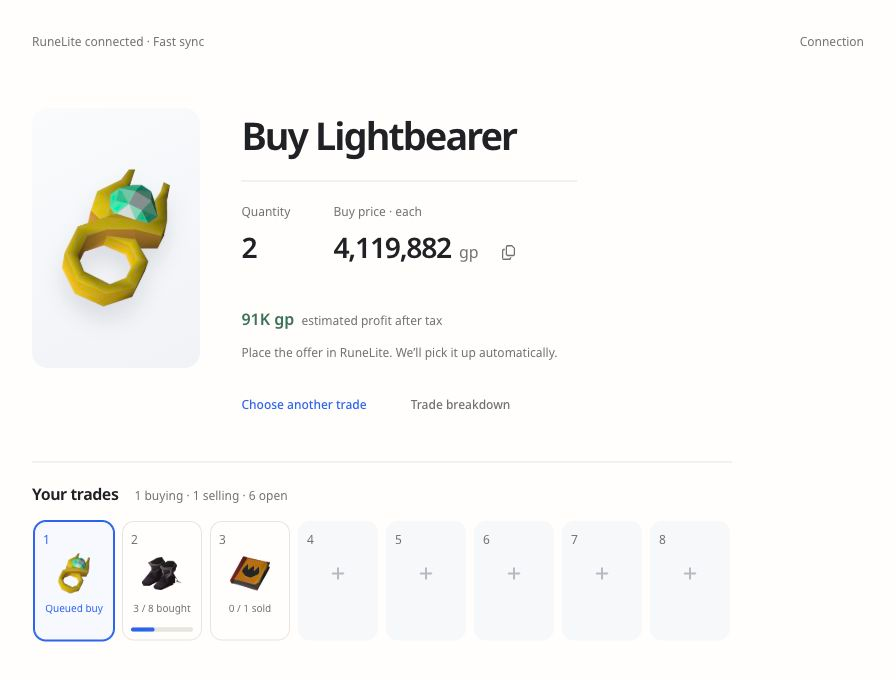
When you finish the current trades, you can get more suggestions, finish the session, or start a fresh plan with a different budget. Trader accounts for your active offers and unsold purchases when you change plans. You manage the offers themselves in the game.
You place and manage the offers yourself. Trader requires attention, and neither fill times nor profits are guaranteed.
Build a plan manually, automatically, or both
Enter your budget or use a preset, then let Auto-fill choose trades, choose every item yourself, or fill the remaining slots around your own choices.
- Your plan includes search, Favorites, and familiar categories such as Big Money, Timing Picks, Reliable Trading, and Best Value.
- Add items from the Market or an open plan slot, and change your selections as you build your plan.
- See how much GP each trade uses and how much you have left to spend. Browse and compare item suggestions before adding them to your plan.
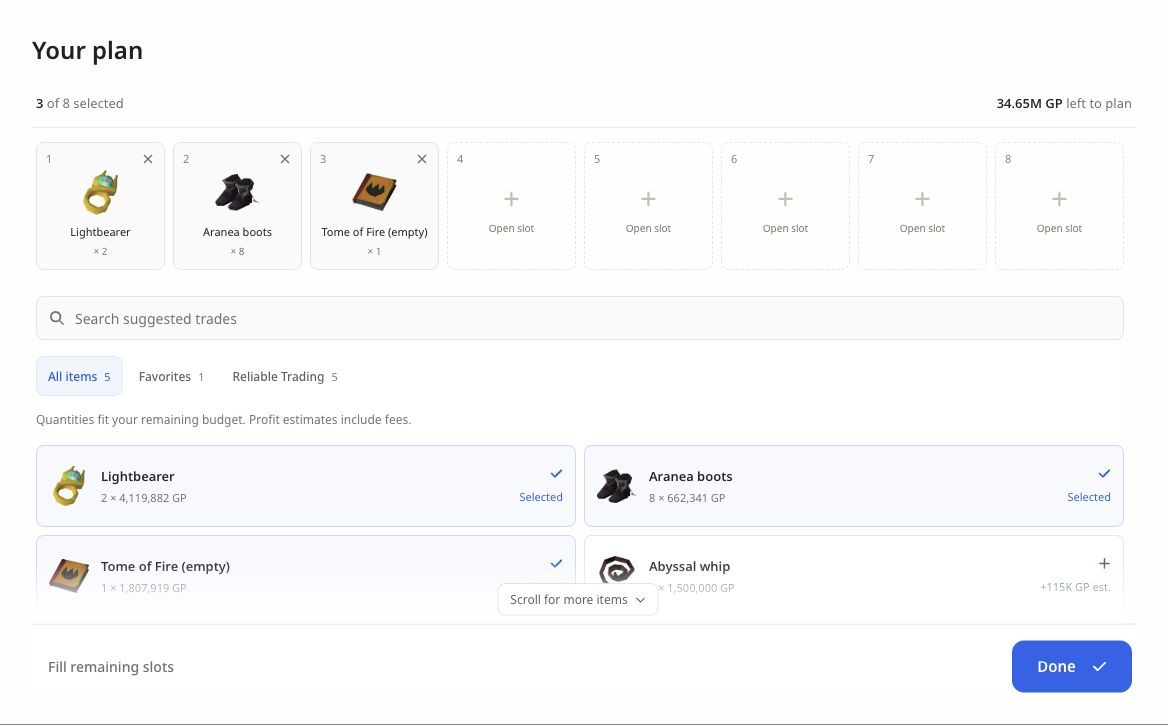
If you prefer the original workflow, Classic Planner is available to customers with access. Trader also has manual tracking, so connecting RuneLite is not required to create a plan.
Suggestions with other traders in mind
Trader varies the starting order of automatic suggestions across customers and can choose different items when similarly strong alternatives are available. Alternatives must fit the original trade budget and meet strict profit, timing, and risk checks. Your selected items and active offers stay in place; this does not change an instruction just because another customer starts trading.
If you allow analytics, we can follow a displayed suggestion through an observed buy, fills, guidance changes, and a completed result. This helps us investigate slow fills, loss warnings, and overlapping suggestions. Missing records and personal purchases are excluded from completed results, and private saved Progress stays separate.
Customers can still receive the same item. This is not an exclusive reservation, and it cannot prevent competition from other players or guarantee a fill or profit.
Connect RuneLite for automatic trade updates
Trader runs in your browser beside RuneLite. It is not a Gielinor Gains RuneLite plugin and it does not control the game. For fast updates, it reads records written by Exchange Logger, an independent plugin in the RuneLite Plugin Hub.
Open Trader in Chrome or Edge on the computer where you play. The setup guide includes pictures of the plugin and its required settings. Choose your RuneLite folder once; that connection covers both the saved profile and the matching trade log. The browser can remember that folder permission for later visits.
With Exchange Logger working and Trader visible, offer changes usually appear within a few seconds. Without Exchange Logger, Trader can read RuneLite’s saved profile, which commonly updates about every five minutes. Market-price refreshes are separate from game updates: refreshing a price does not make RuneLite write a new save.
On mobile, you can view saved plans and Progress where available. Connecting to RuneLite requires the computer where you play; a phone cannot read those files remotely.
Choose which purchases to trade
When you first connect RuneLite, Trader starts tracking new trades. You can also select an offer already in your exchange and choose Guide this trade. Existing offers count toward your occupied slots, and earlier purchases stay outside your active session.
Bought a bond for membership or gear you want to keep? Choose Not for trading on its sell instruction. Trader saves that choice for the purchase and keeps it separate from your trading guidance and profit results.
That choice applies to the specific purchase, not the item forever. You can buy another bond later and trade it normally. Search or page through Personal purchases to review what you have set aside, with quantities and dates to distinguish purchases of the same item. Choose Restore purchase if you decide to trade that purchase.
Session results, Progress, and 24 achievements
The session summary shows recorded results after estimated GE tax and fees, including losing trades. Open a completed trade to see its purchase cost, sale value, fees, and net result. Open inventory and missing purchase records are kept separate from completed profit.
- Your Progress saves results across sessions when you opt in. Its totals, completed-trade count, chart, and calendar use the same 30-day, 90-day, or all-time period.
- Select a day on the chart or activity calendar to inspect that day’s results. The calendar distinguishes profitable days, losses, break-even days, and days without completed trades.
- 24 achievements recognize recorded profit, completed trades, trading days, and profitable days. These are lifetime milestones, with no daily streak to maintain.
- You can preview and share an individual session through a link, then disable that link later. Sharing is optional and separate from saving private Progress.
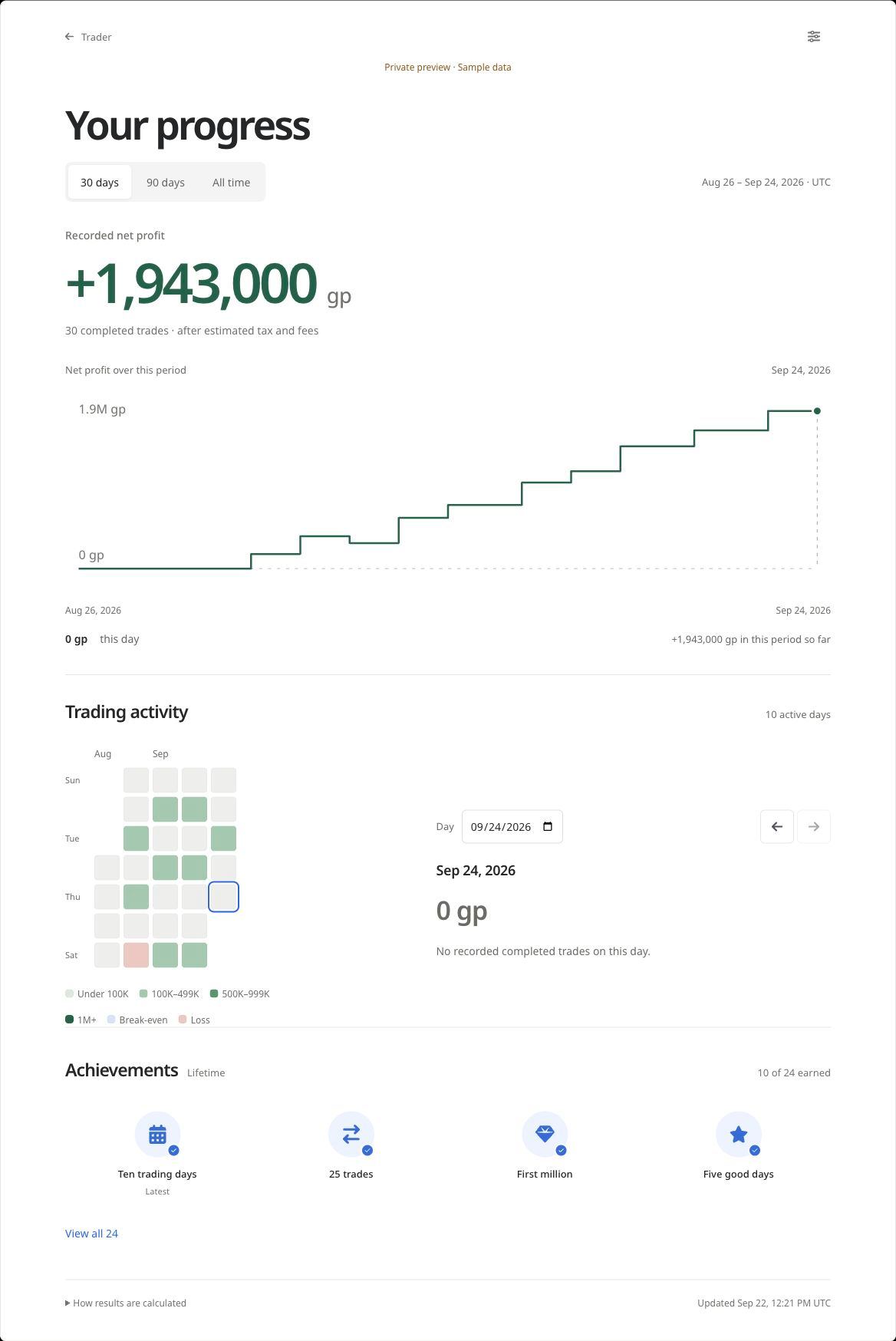
Earlier trade history is an optional import, not something added automatically. Importing old results does not bring those trades into your active guide. Missing or conflicting records are flagged and excluded where a result cannot be supported. Recorded results can include trades you chose yourself; they are not proof that every gain came from a Trader recommendation.
More selective Dump Alerts and fewer duplicate emails
Dump Alerts still look for sudden sell-offs that may create an opportunity if prices recover. The qualification and email delivery rules have changed:
- A qualifying alert needs a measured price drop of at least 15% and at least 250,000 GP of estimated after-tax recovery value.
- That value is calculated using the recommended quantity, not the full GE buy limit. This avoids advertising a large potential return that depends on buying an unrealistic amount.
- Repeated readings of the same dump do not keep producing new emails. Every separate opportunity that passes the checks remains eligible for delivery.
- Opportunities detected together are grouped into one email, with the largest estimated after-tax recovery value first.
An alert is a lead to investigate. Recovery is uncertain, and you may not be able to buy at the quoted price. Receiving Trader access does not automatically enable alert emails; that remains your choice.
Improved recommendations and the free Market
The Market remains free, including suggested offers, quantity estimates, timing information, item research, and Favorites. Both the Market and Trader use the updated recommendations.
- Trade selection and quantity sizing take more account of recent buying and selling activity, price support, budget, and the expected trading window. A large displayed spread on its own is not enough to make a good suggestion.
- Trader checks individual items as you trade. Those checks help identify when a planned buy does not fit current prices or activity, and when a sell offer needs attention.
- Refresh the Market when you want to update its prices. The refresh control shows how recently the data was updated, and your search stays in place through a refresh.
- During brief price-feed delays, available items stay visible so you can keep browsing.
Trader respects the F2P preference, limiting suggestions to free-to-play items and plans to three GE slots. Because the F2P item pool is much smaller, the purchase pages recommend the free Market if you would be buying only for F2P trading.
Site design, performance, and everyday usability
- The Market, Trader, About, Help, Platform Updates, sign-in, and membership pages share consistent layouts, spacing, controls, and language.
- The Trader product page includes a full session demo alongside the game, an interactive budget example, and a connection check you can try before buying.
- Pages load more smoothly and stay in place as you navigate, with fewer interruptions while you browse and trade.
- This release also includes security and reliability improvements for sign-in, saved account data, and payments.
Membership options and billing
New customers get the same Trader and Dump Alerts features with any of these options: $6.99 per month, $39.99 per year, or $79.99 once for lifetime access, in USD. Monthly and annual memberships renew until canceled. Lifetime has no renewal charge.
Membership & Billing explains whether access comes from an original Planner upgrade, a gift, a lifetime purchase, or a subscription. It shows the relevant renewal or access-end information and provides billing controls when there is a subscription to manage.
If you upgrade a paid Trader subscription to lifetime, eligible unused paid time is credited toward the purchase. The subscription renewal is stopped after the lifetime payment is confirmed. Existing customer prices and previously purchased lifetime access are not replaced by the new prices.
Get started
Already have access? Open Trader, connect RuneLite or choose manual tracking, and set your budget. If you want to see how it works first, watch the demo. If your account or upgrade looks wrong, contact me using the email you normally sign in with.
Thank you to everyone who supported Planner and helped me improve it. I’m looking forward to seeing you use Trader. — Cam